Ga naar de hoofdinhoud
SDS software: What’s right for your company? (authoring vs management)
Guidance on what you need to know about SDS authoring and SDS management software.
SDS software: What’s right for your company? (authoring vs management)
If you’re searching for “SDS software,” you’re probably not after just a feature list.
You’re looking for a solution to prevent the same problems from recurring: outdated SDSs, mismatched supplier classifications, slow updates, and overreliance on a single person on the team.
SDS software typically falls into two categories: SDS authoring (creating SDSs and labels) and SDS management (organizing, distributing, and making SDSs easy to access). Many organizations end up needing both as they grow.
Key takeaways
- If you manufacture or formulate, you likely need SDS authoring. If you store/use hazardous chemicals across sites, you likely need SDS management. Many teams need both.
- SDS software should make SDS access fast and reliable.
- The best systems reduce rework by improving consistency across suppliers, ingredients, and product families.
Table of contents
-
What is SDS software?
-
SDS authoring vs SDS management: what’s the difference?
-
The real-world problems SDS software should solve
-
A simple decision guide
-
SDS software evaluation checklist
-
Why Enhesa SDS might be what you’re looking for
-
How Enhesa compare to other SDS software
-
FAQs
1) What is SDS software?
SDS software helps organizations create, manage, distribute, and maintain Safety Data Sheets, so hazard information stays accurate, accessible, and consistent as products, suppliers, and regulations change.
It matters because SDSs are a standardized hazard communication tool: they follow a structured format and include the minimum required information by local rules (e.g., OSHA HazCom in the US) and across GHS-aligned jurisdictions globally.
2) SDS authoring vs SDS management: what’s the difference?
If you’re searching for an SDS software solution, it’s crucial to understand the various types available and how they can benefit you.
SDS authoring software
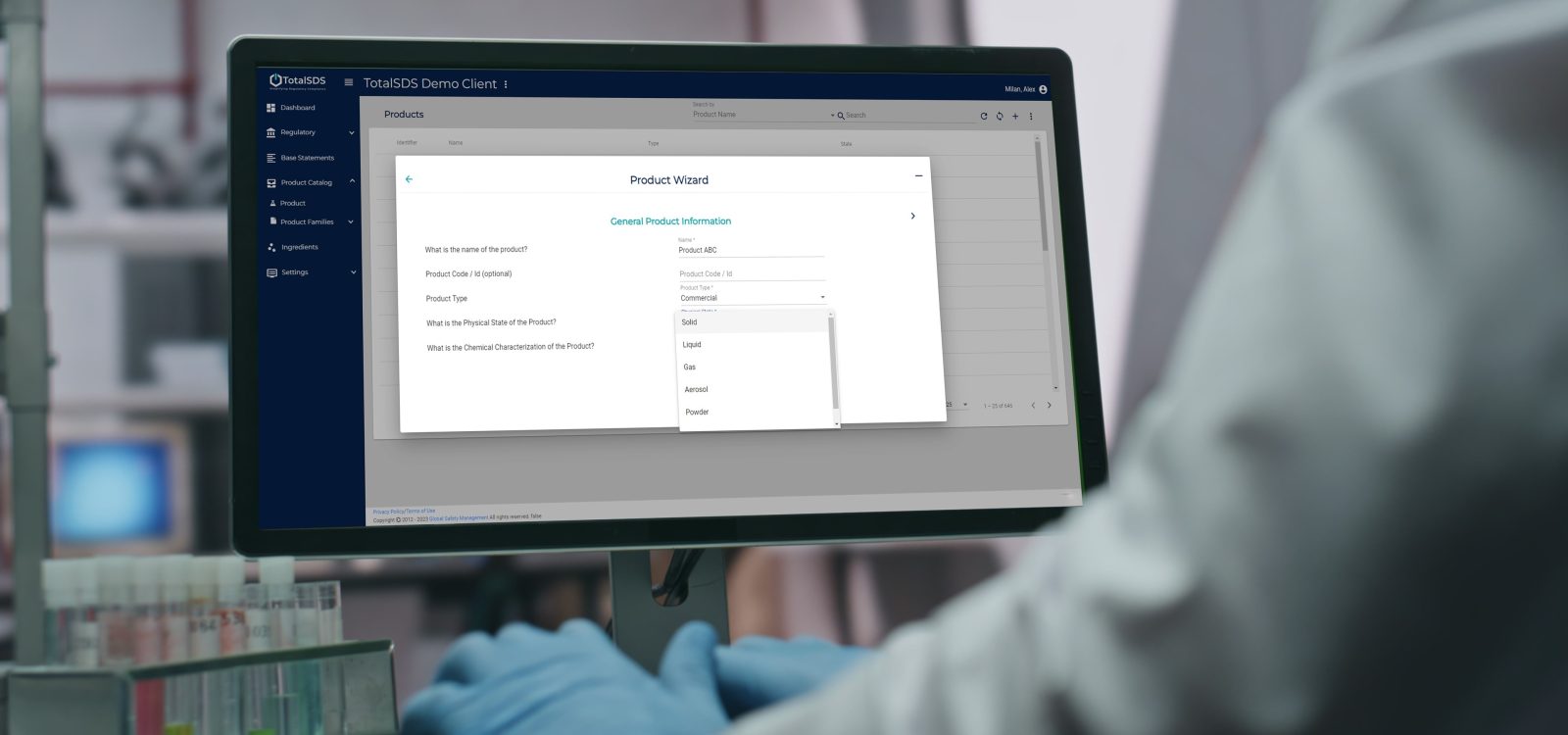
SDS authoring software supports creating SDSs (and often labels) and includes a workflow for classification, consistent phrasing, and reusable data across products. SDS Author by Enhesa is an example: it’s built around a global ingredient library and reusable data across ingredients and product families to speed authoring while maintaining flexibility.
SDS management software
SDS management software helps you organize and provide access to SDSs across your business—especially when you have multiple sites, departments, or field teams who need quick access. For example, SDS Manager by Enhesa centralizes access and maintenance to keep SDSs current and usable.
SDS software selection: easy guide (authoring vs management)
| Primary use cases | The type of SDS software to evaluate |
|---|---|
| Manufacturing, formulating, or private labeling products and must create/maintain SDS. | SDS authoring software |
| Using/storing hazardous chemicals, and need SDS from suppliers to be organized, current, and easy for employees to access. | SDS management software |
| Creating SDS and distributing/managing them across sites, teams, territories, or customers, with frequent updates. | End-to-end SDS program (authoring + management) |
3) The real-world problems SDS software should solve
Let’s start with the scenario you probably recognize you have multiple suppliers who classify the same material differently, and a small formulation or supplier change triggers manual SDS updates — plus translation work if you’re supporting multiple markets.
This is where an SDS software earns its keep. Not by being another platform to work with, but by helping you update quickly, keep data consistent, and reduce the risk of human error, delays, and misclassification.
Another common organizational failure mode is SDSs living in binders, inboxes, and drives, with the current version often unclear. SDS by Enhesa’s guidance highlights how centralized, accessible storage reduces maintenance and accessibility issues — especially when employees need SDSs during shifts in their work areas.
4) A simple decision guide
Here’s a quick way to choose an SDS software that works for you.
If you manufacture, formulate, or private label
Start by asking: Do we need to author SDSs, or mainly manage supplier SDSs? If you create products, you’ll want an authoring workflow that ensures consistency across product families and reduces the risk of misclassification.
If you mainly use hazardous chemicals at work sites
Your biggest needs are usually access and maintenance: fast search, mobile access, version control, and a clear process to keep SDSs current.
If you’re growing (more sites, more products, more markets)
You’ll likely want an end-to-end approach that supports both authoring and management, so you’re not juggling disconnected systems. Enhesa positions its SDS offering as a streamlined solution for authoring and managing SDSs together.
5) SDS software evaluation checklist (what to look for)
Core benefits checklist
- Fast SDS access for employees during shifts (including mobile).
- A single source of truth (so you don’t manage five versions of the same SDS).
- Permissions and roles (so edits are controlled).
- Version history/audit trail (what changed, when, and why).
- Reuse and standardization (phrases, product families, ingredient data) if you author SDSs.
- Global considerations (if you sell internationally, plan for regional requirements and languages).
6) Why Enhesa SDS Software might be the right choice for you
If you’ve ever watched an SDS request turn into a mini fire drill, you already know the real problem isn’t the document itself.
It’s the ripple effect: someone needs the SDS to ship, a customer wants it in the right language, a supplier has updated a raw material SDS, and suddenly you’re lost in spreadsheets, folders, and outdated updates.
Enhesa SDS software is built for that reality.
That’s why 3,000+ customers rely on it, with support for 75+ languages, and over 22,000+ customer-authored SDSs on the platform.
It’s not just a software, but a system that holds up when your product line grows, your markets expand, and the pace of change ramps up.
The impact is most noticeable in the area of time.
According to training benchmarks, Enhesa SDS software can reduce the time needed to create complex SDSs by as much as 80%.
The goal isn’t just about speed for its own sake. It’s about what speed enables: reducing launch delays, decreasing reliance on a single internal expert, and establishing a process that your regulatory, product stewardship, R&D, and EHS teams can reliably operate —consistently — across different products and locations.
Enhesa SDS stands apart because it’s been built by compliance experts as an operational system designed for global use — combining deep regulatory intelligence with human experts always ready to support.
If you’re comparing SDS software options, the differences that matter show up in a few practical areas — how authoring is guided, how data is maintained, how reuse works across product lines, and how reliably people can access the right SDS when they need it.
Here’s a side-by-side view to make those differences clear.
7. Enhesa SDS software vs. a typical SDS software alternative (high-level comparison)
| Capability area | Enhesa SDS software | SDS software alternative |
|---|---|---|
| End-to-end program (author + manage) | Supports SDS authoring and SDS distribution/access as connected workflows. | Often split across separate tools/modules, increasing handoffs and version risk. |
| Access to deep regulatory intelligence | Backed by regulatory intelligence and expert review designed to improve accuracy and confidence in outputs as requirements evolve. | Some tools rely more heavily on customer-maintained rules, manual interpretation, or external services. |
| Guided authoring workflow | Wizard-based workflow with built-in guidance and checks for consistent execution. | many workflows depend more on user process discipline. |
| Classification efficiency | Product Wizard automates key classification calculation work. | Manual classification effort is often higher (varies by vendor). |
| Global usage | Built for multi-market programs, including jurisdictional requirements and 75+ languages supported as part of normal operations. | Coverage and localization are often uneven or require add-ons and workarounds |
| Supported by human experts | Access to real support (including account management) and the option to augment with expert services when teams need help scaling or handling edge cases. | Many rely heavily on ticketing systems and partner ecosystems for deeper assistance. |
| Governed identifiers | Global CAS library maintained by a regulatory team for in-software access. | Many programs rely on customer-managed reference data. |
| Standardization at scale | Standard Phrases + Base Statements support reusable, controlled SDS language (including bulk updates). | Bulk governance is often limited or harder to manage at scale. |
| Reuse across similar products | Product Copy supports fast duplication while preserving customizations (useful for private-label formats). | Preserving structured customizations may be inconsistent. |
| Workforce access (incl. emergencies) | QR + mobile access, including offline access for emergencies. | Mobile/QR/offline support varies and should be validated during evaluation. |
| SDS library maintenance | SDS sourcing for automated updates + centralized reporting and oversight. | Update workflows vary; many depend on manual chasing and reconciliation. |
FAQs
What is SDS software?
SDS software helps create and manage Safety Data Sheets, ensuring hazard information remains accurate, consistent, and accessible across teams.
Do I need SDS authoring software or SDS management software?
If you make products, you’ll likely need authoring. If you mainly store/use chemicals and rely on supplier SDSs, you’ll likely need management. Many companies need both as they scale.
What should an SDS include?
OSHA Appendix D specifies minimum information by section (particularly Sections 1–11 and 16).
How does SDS software help with compliance?
It reduces the operational risk of outdated, inconsistent, or inaccessible SDSs by centralizing access, supporting maintenance, and standardizing how information is stored and reused.
What if my suppliers classify the same material differently?
That’s a common issue. A strong system helps you manage multiple data sources, standardize how you interpret inputs, and reduce rework when one supplier changes a classification or document.