Ga naar de hoofdinhoud
SDS authoring software buyer’s guide (2026)
Learn what SDS authoring software is, who needs it, must-have features, how to compare vendors, and how SDS Author by Enhesa speeds global SDS creation with guided workflows, multilingual output, and audit-ready control.
How to choose the right tool for faster, safer global SDS creation
In today’s complex regulatory environment, relying on manual expertise or a single team member for SDS management can introduce risk and inefficiency.
This guide empowers regulatory, product stewardship, and EHS leaders to improve their SDS authoring processes by providing clear evaluation criteria, real-world case studies, and a practical scoring model to help them select the right SDS authoring Software.
Guide menu
-
What a SDS authoring software is
-
Who typically needs SDS authoring software
-
When SDS authoring software is needed
-
Must-have capabilities checklist
-
How to compare SDS authoring tools
-
Why TotalSDS Author by Enhesa
-
Technical appendix (for evaluators)
-
FAQ
What is SDS authoring software?
SDS authoring software helps chemical manufacturers and formulators create compliant Safety Data Sheets (SDSs) by guiding users through hazard classification and SDS section completion, then producing jurisdiction-ready documents (often across multiple countries and languages).
Who typically needs SDS authoring software?
Chemical manufacturers involved in specialty chemicals, coatings, fragrances, lubricants, biotech, and agriculture require SDS authoring software to improve their processes.
These companies often produce over 20 Safety Data Sheets (SDSs) annually while operating across multiple regions or expanding into new markets.
If your organization relies on spreadsheets, outdated platforms, or external consultants for SDS creation, you may face challenges related to costs, delays, and process management.
I would absolutely recommend… The support is great. The service is great. It’s a major improvement and I know we’re in good hands as regulations evolve.
Client feedback for SDS Author.When SDS authoring software is needed
- Expanding into a new market or shipping into more jurisdictions.
- Reformulating products (ingredients, classification changes, and SDS changes).
- Failing an internal or external audit or needing documentation that’s ready for review.
- Major regulatory changes that require updates to SDS.
Why it’s a must-have for global companies
Safety requirements vary across markets and are governed by local regulatory bodies, emphasizing the importance of understanding regional compliance standards.
Within the EU, REACH Annex II (amended by Regulation (EU) 2020/878) sets specific SDS compilation requirements and are continually evolving and require ongoing updates.
In the United States, the Occupational Safety and Health Administration (OSHA) sets the standards for required SDS content under its Hazard Communication Standard.
Globally, the UN GHS influences the SDS format and standardizes how hazards are communicated through labels. However, because countries may adopt different versions of the GHS and introduce their own local regulations, this leads to varying requirements and potential complications.
Even with UN GHS, different jurisdictions adopt various revisions and local rules, which causes differences in classifications and document requirements across markets.
This underscores the need for a strategic and diligent approach rather than simply copying and modifying SDSs on a case-by-case basis.
It is crucial for any organization that manufactures, imports, distributes, stores, or uses hazardous chemicals to have SDSs readily available to employees worldwide.
The real costs of manual authoring and outsourced SDS writing
The main cost associated with manual authoring is time. Hidden costs include delays in SDS preparation, which lead to product holdups and gradually increasing compliance risks that eventually become unavoidable. Common issues reported are:
– SDS writing takes too much time.
– The process relies entirely on manual work.
– Uncertainty about meeting OSHA, COSHH, UN GHS, or EU regulations.
– Only one person knows how to create SDSs.
Even when outsourcing, you often face new challenges, including longer turnaround times, backlogs, rising costs, and difficulty adapting quickly as products evolve.
What “good” looks like in SDS authoring software
Below is a practical checklist of capabilities that matter in real-world evaluations — essential for reducing rework, accelerating output, and supporting audit-ready governance.
Must-have capabilities checklist
| Capability | Why it matters | What to ask during evaluation |
|---|---|---|
| Guided authoring workflow | Reduces errors, speeds onboarding, and prevents depending on one single team member or team. | “Show how a new SDS is created end-to-end. Where are checks built in?” |
| Jurisdiction support + regulatory updates | Country-specific requirements change; SDS output must stay aligned | “Which jurisdictions do you support today? How are updates maintained and released?” |
| Multilingual authoring/translation support | Many jurisdictions require local language SDSs | “How do you generate language variants and keep them synchronized over time?” |
| Ingredient / CAS library governance | Accurate identifiers and ingredient data are foundational | “Where does substance data come from, and how is it maintained?” |
| Classification assistance + traceability | You need confidence in hazard outputs and why they were applied | “Can the system explain why a classification is included? Can we override with expert judgment?” |
| Version control + audit trail | Audits and internal reviews require who/what/when tracking | “Can I compare versions, revert changes, and log reviewer notes?” |
| Templates, standard phrases, bulk statements | Consistency and scale across product lines | “How do we standardize recurring content and apply it across SDSs?” |
| Product copying / reuse | Private-label and similar formulations shouldn’t require re-authoring from scratch. | “Can we duplicate a product and preserve customizations?” |
| Trade secret controls | Protect IP while staying compliant | “How do we hide or range sensitive ingredients in outputs?” |
How to compare SDS authoring software
Many vendor comparisons tend to fall short because teams often find themselves debating over features instead of aligning on what truly matters most to their operations, such as speed, global expansion, audit readiness, IP control, or collaboration.
The typical top outcomes we see when companies use SDS authoring software like Enhesa are:
- Faster SDS creation and updates.
- Confident global compliance coverage.
- Audit-ready control and consistency.
We have put together the template below to score vendors using weighted criteria (adjust weights to your business needs).
| Category | Weight | What ‘excellent’ looks like |
|---|---|---|
| Global jurisdiction coverage + update process | 25% | Clear list of supported jurisdictions, predictable update cadence, and change visibility |
| Authoring workflow speed + usability | 20% | Guided steps, built-in checks, fast iteration for similar products |
| Data quality (ingredients/CAS) + classification support | 20% | Governed ingredient library + explainable classifications + expert override |
| Audit trail, versioning, collaboration | 15% | Version compare/revert, check-in/out controls, reviewer comments |
| Translation + multi-language output | 10% | Multilingual SDS output with manageable ongoing updates |
| Standardization & scale features | 10% | Templates, standard phrases, bulk statements, product families/copy |
Why choose SDS Author by Enhesa
SDS Author by Enhesa is designed for manufacturers who want in-house SDS control without turning regulatory compliance into a bottleneck — combining guided authoring workflows, governed ingredient data, and scalable features for repeated product formats.
A trusted solution
customers worldwide
languages supported
times faster SDS deployment
Why TotalSDS Author is different

Built by compliance experts

Powered by deep regulatory intelligence

Designed for global use

Supported by real humans
TotalSDS Author’s unique key capabilities
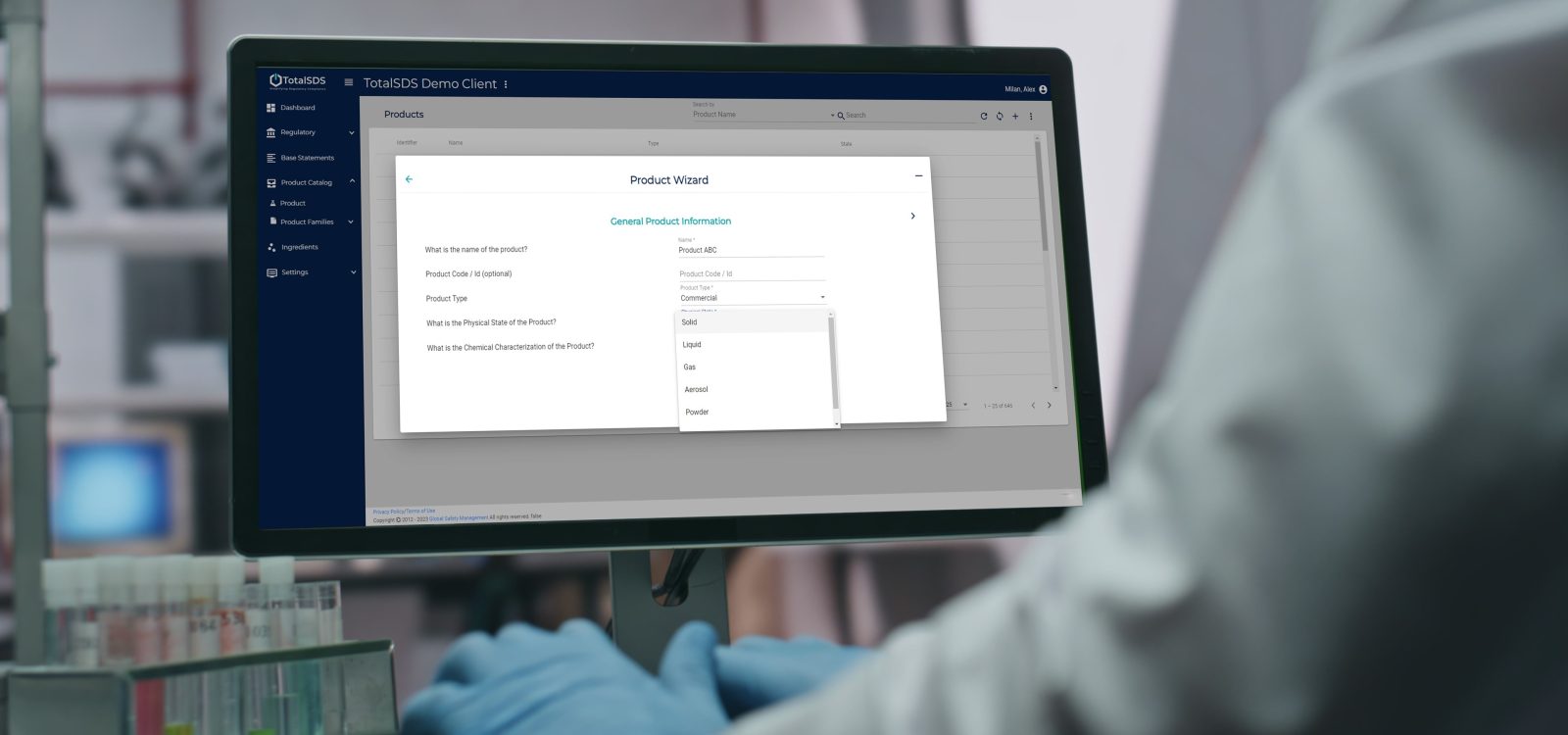
- Classify products faster and with fewer errors using the Product Wizard, which automates key classification calculations.
- Keep SDS language consistent across all sections everywhere with Standard Phrases and Base Statements for repeatable sections, disclaimers, and bulk updates.
- Reuse work across similar and private-label products with Product Copy, so you can duplicate an SDS and keep the right customizations.
- Build once, reuse across formulations with Mixture Ingredient Creation, turning supplier raw materials into production-ready SDSs.
- Trust your substance identifiers with the Global CAS Library, maintained by a regulatory team of experts.
- Stay audit-ready with Audit Trail and Versioning (track changes, compare versions, revert fast).
Book a demo
Why the world’s leading companies choose SDS Author by Enhesa.
Technical Appendix (for evaluators)
A) SDS structure requirements (what your tool must reliably support)
In the US, OSHA’s SDS framework specifies the required content and aligns it with standardized section headings. Your authoring system must support a consistent, compliant population of required sections and maintain revision integrity.
For global alignment, jurisdictions base requirements on UN GHS (with local adaptations). A practical implication: your tool must handle jurisdiction-specific differences without forcing teams to rebuild everything from scratch.
B) Workflow controls: audit trail, versioning, and collaboration
Look for demonstrable capabilities to:
- Track create/update history (user + timestamp).
- Compare versions and revert changes.
- Require check-in/check-out style controls to prevent collisions.
- Store comments/notes tied to revisions.
C) Data model depth: ingredients, mixtures, and explainability
A robust authoring platform should support both “pure” substance identifiers and the creation of mixture ingredients from supplier raw material SDSs or in-house created intermediaries, with governed data that can be reused across products.
During evaluation, ask the system to explain why a classification is included (e.g., threshold triggered, physical property input) and verify you can apply expert judgment where needed — with the change tracked.
D) Standardization at scale
The fastest SDS authoring programs don’t just write SDSs — they standardize repeatable content (phrases, disclaimers, common sections) and reuse product structures (families, copies) to avoid duplication and unnecessary changes.
E) Multi-language and multi-jurisdiction output
If you ship internationally, ask for a proof demonstration that shows how a single product is adapted to multiple regions and languages, and then demonstrate how updates are applied and how reviewers confirm the outputs.
FAQs
What is SDS authoring software?
SDS authoring software helps manufacturers create compliant SDS documents by supporting hazard classification inputs, guiding users through SDS completion, and producing standardized SDS outputs for required jurisdictions and languages.
What’s the difference between SDS authoring and SDS management software?
Authoring is for creating SDSs (typically manufacturers); management is for organizing and providing access to SDS libraries for employees, audits, and incident response (often employers operating facilities).
If you manufacture products, you usually need authoring. If you run facilities, you usually need management. If you do both, you’ll likely want both — ideally connected, like with SDS Manager by Enhesa.
How many sections are in an SDS?
The standardized GHS-style format uses 16 sections, and OSHA’s Appendix D specifies required information under standardized headings (with US requirements focused on sections 1–11 and 16).
Why do SDS requirements vary by country if GHS exists?
GHS provides a harmonized framework, but jurisdictions adopt different revisions and may add local requirements, which drives variation in classification and SDS expectations across markets.
When should a company move off Word/Excel for SDS authoring?
Usually, when SDS volume grows (e.g., 20+ per year), multiple jurisdictions are involved, updates become frequent, or the process becomes dependent on a single expert and manual rework.
What features matter most in SDS authoring software?
Guided workflow, jurisdiction support, multilingual output, governed ingredient data, explainable classification, and audit-ready versioning are typically the core differentiators in real evaluations.
How do I evaluate “speed” claims for SDS authoring software?
Ask for a live workflow demo using one of your real products: create a new SDS, generate variants, make a revision, and show version compare/revert — then measure time and touches.
Can SDS authoring software help protect trade secrets?
Many authoring workflows, such as those supported by SDS Author by Enhesa, support hiding or ranging from sensitive ingredients in outputs while maintaining compliant hazard communication (controls vary by tool).
What’s a reasonable implementation approach?
Start with jurisdictions/languages, standardize repeatable content, build core ingredients/mixtures, pilot one product family end-to-end (including revisions), then expand.
The SDS Enhesa team can advise further — book a call with us today to find out.
How do I get a demo of SDS Author by Enhesa?
Book a demo to review your workflow, jurisdictions, and priorities — and see how SDS Author by Enhesa supports guided SDS creation, standardization, multilingual output, and audit-ready control.